> ## Documentation Index
> Fetch the complete documentation index at: https://docs.docswrite.com/llms.txt
> Use this file to discover all available pages before exploring further.
# WordPress Plugin
> Enhanced Docswrite features with our official WordPress plugin
## Docswrite WordPress Plugin
The Docswrite WordPress plugin enhances your publishing workflow by providing advanced features and better integration with your WordPress site. It's designed for editorial and content teams who want to automate and optimize their content publication process.
## 🌟 Key Features
The plugin unlocks powerful capabilities for your content workflow:
* **Enhanced SEO Support**: Full integration with Yoast SEO and RankMath plugins
* **Bulk Publishing**: Import multiple documents at once for efficient content management
* **Programmatic SEO**: Create and optimize large numbers of unique, high-quality pages at scale
* **AI-Powered Content**: Generate SEO-optimized content automatically
* **Enhanced Security**: Advanced security features and user management controls
* **Better Compatibility**: Improved formatting and media handling
## 📦 Installation
Install Docswrite from the WordPress plugin directory or download it directly:
* Search for "Docswrite" in your WordPress admin under Plugins → Add New
* Or download from [WordPress.org](https://wordpress.org/plugins/docswrite/)
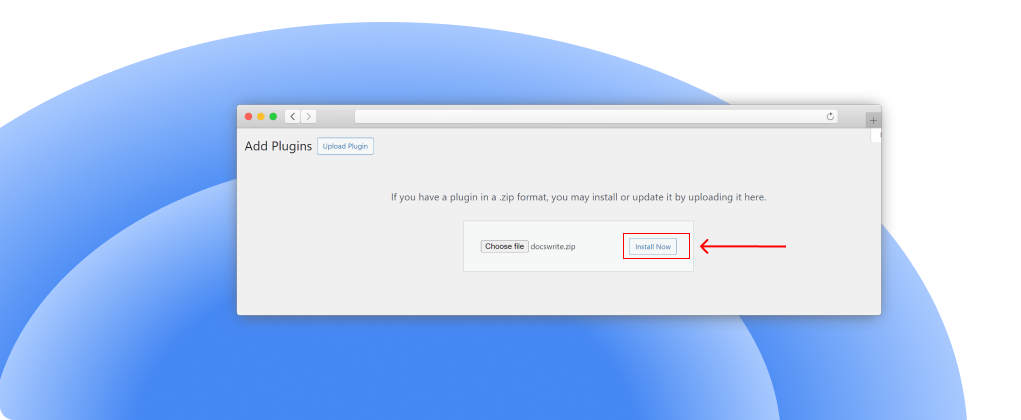
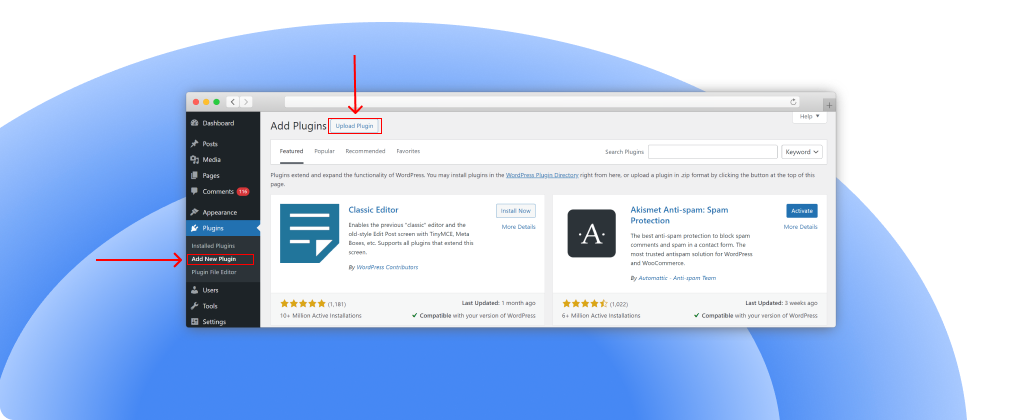 Upload and install the plugin, then activate it from the Plugins menu.
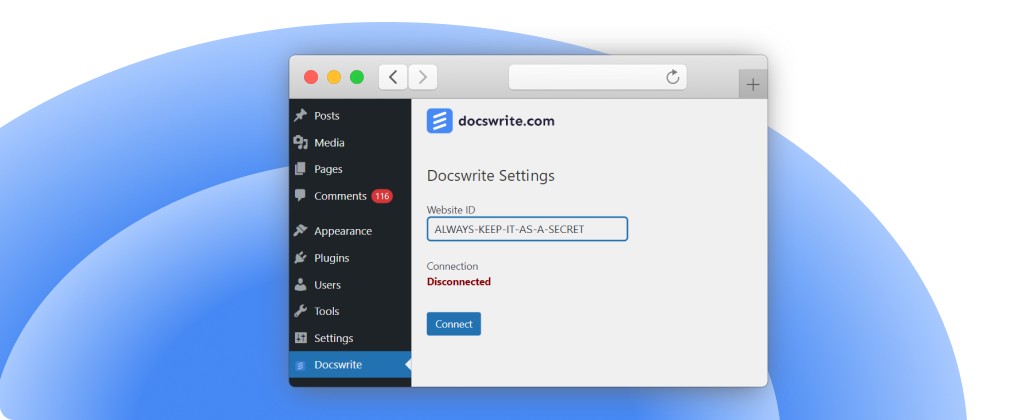
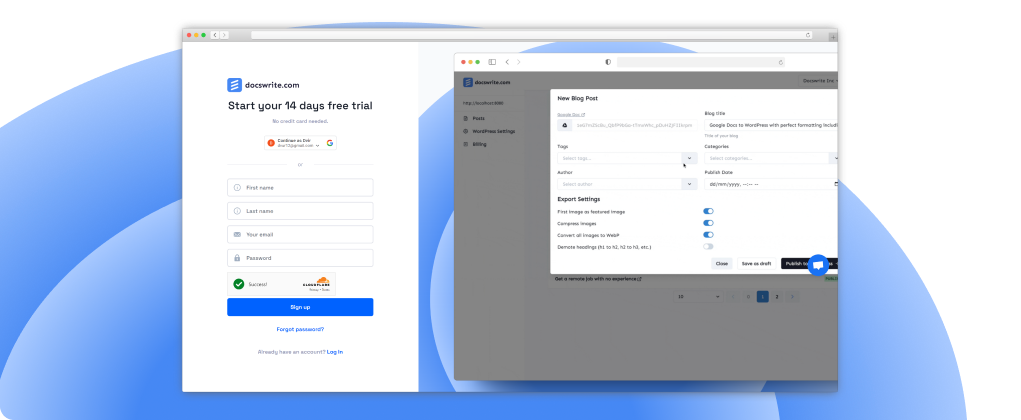
 After activation, click "Connect" to link your WordPress site with your Docswrite account.
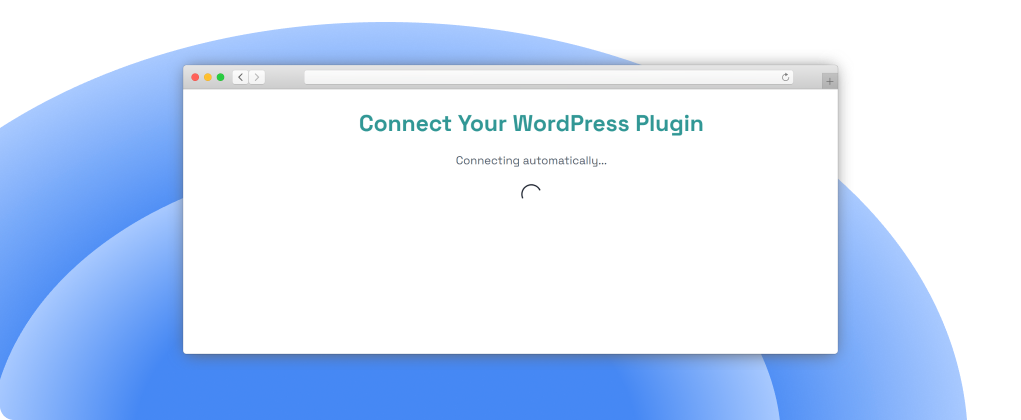
 You'll be redirected to Docswrite to authorize the connection.
If you have a Docswrite account, your site will be automatically registered. If not, you'll be redirected to the signup page.
You'll be redirected to Docswrite to authorize the connection.
If you have a Docswrite account, your site will be automatically registered. If not, you'll be redirected to the signup page.
 ## 🛠️ How It Works
Once installed and activated, the plugin works seamlessly with Docswrite:
1. **Secure Connection**: The plugin creates a secure Website ID that connects your site to Docswrite
2. **Enhanced Publishing**: All Docswrite publications benefit from improved compatibility
3. **SEO Integration**: Automatic support for popular SEO plugins
4. **Media Handling**: Better image processing and upload management
## 🛠️ How It Works
Once installed and activated, the plugin works seamlessly with Docswrite:
1. **Secure Connection**: The plugin creates a secure Website ID that connects your site to Docswrite
2. **Enhanced Publishing**: All Docswrite publications benefit from improved compatibility
3. **SEO Integration**: Automatic support for popular SEO plugins
4. **Media Handling**: Better image processing and upload management
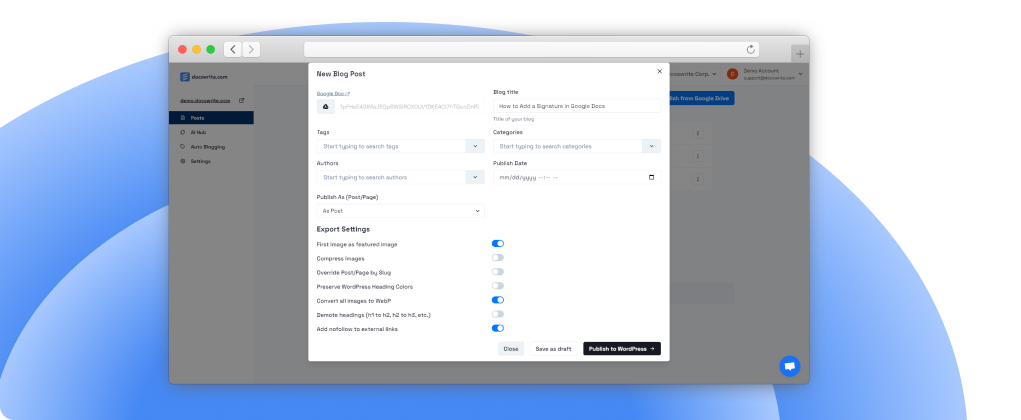
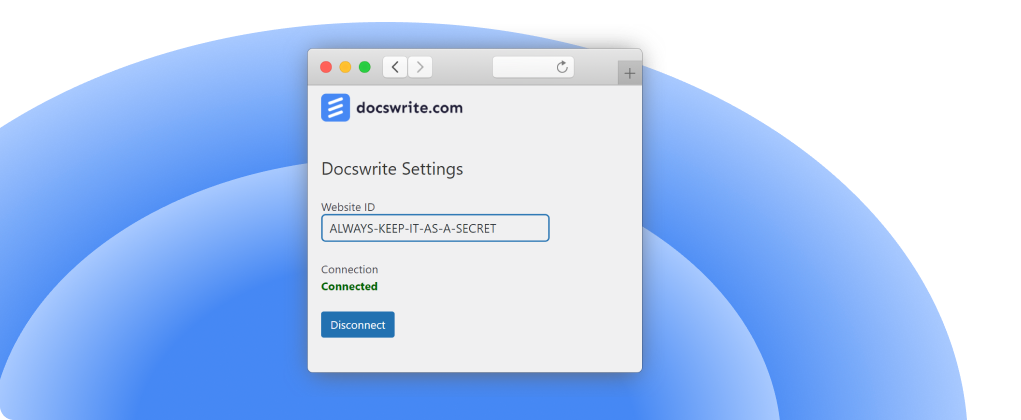 After connection, you can start publishing from the [Docswrite dashboard](https://docswrite.com/dashboard).
 ## Enhanced SEO Features
The plugin provides advanced SEO capabilities:
### Yoast SEO Integration
* **Focus Keywords**: Set primary and secondary keywords
* **Meta Descriptions**: Custom meta descriptions
* **SEO Titles**: Override default titles
* **Canonical URLs**: Set canonical URLs for better SEO
### RankMath Integration
* **Focus Keywords**: Optimize for target keywords
* **Advanced Settings**: Access all RankMath features
* **Schema Markup**: Automatic schema generation
### Newspack Support
For Newspack theme users:
* **Article Summaries**: Enhanced article summary features
* **Post Subtitles**: Support for post subtitles
* **Advanced Typography**: Better text formatting
## Requirements
To use all plugin features, ensure you have:
* ✅ WordPress 5.6 or higher
* ✅ PHP 7.4 or higher
* ✅ A Docswrite account
* ✅ **Permalink structure enabled** (required for slugs)
## Enhanced SEO Features
The plugin provides advanced SEO capabilities:
### Yoast SEO Integration
* **Focus Keywords**: Set primary and secondary keywords
* **Meta Descriptions**: Custom meta descriptions
* **SEO Titles**: Override default titles
* **Canonical URLs**: Set canonical URLs for better SEO
### RankMath Integration
* **Focus Keywords**: Optimize for target keywords
* **Advanced Settings**: Access all RankMath features
* **Schema Markup**: Automatic schema generation
### Newspack Support
For Newspack theme users:
* **Article Summaries**: Enhanced article summary features
* **Post Subtitles**: Support for post subtitles
* **Advanced Typography**: Better text formatting
## Requirements
To use all plugin features, ensure you have:
* ✅ WordPress 5.6 or higher
* ✅ PHP 7.4 or higher
* ✅ A Docswrite account
* ✅ **Permalink structure enabled** (required for slugs)
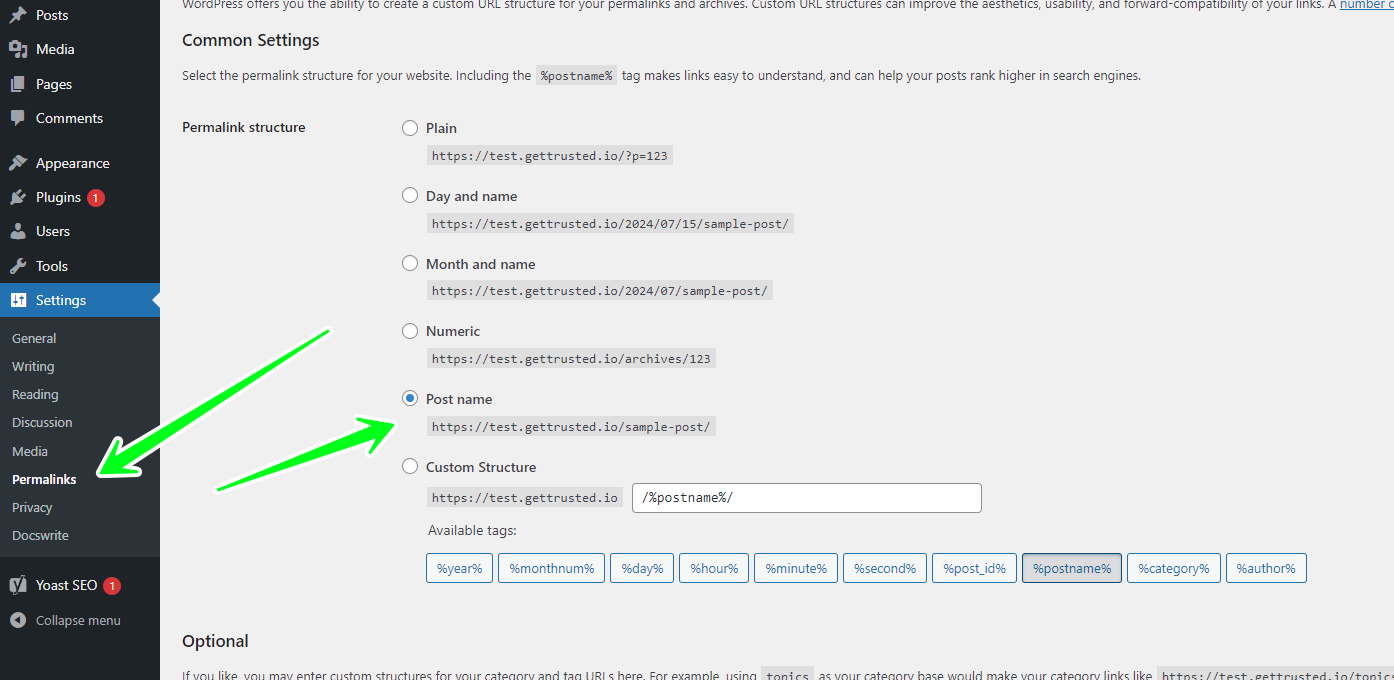 Make sure your permalink structure is set to anything other than "Plain" for
the plugin to work properly with custom slugs.
## Advanced Features
### Bulk Publishing
* Import multiple Google Docs simultaneously
* Batch process content with consistent formatting
* Queue management for large publishing jobs
### Programmatic SEO
* Create thousands of pages from data sources
* Template-based content generation
* Automated optimization for search engines
### Content Workflow Management
* Collaborative editing features
* Multi-user access controls
* Content approval workflows
### Enhanced Security
* Secure API connections
* User permission management
* Protected content handling
## Troubleshooting
### Common Issues
**Connection Problems**
* Ensure you're logged into Docswrite when connecting
* Check that your WordPress site is accessible from the internet
* Verify your permalink structure is not set to "Plain"
**SEO Settings Not Working**
* Confirm you have Yoast SEO or RankMath installed
* Check that the plugins are activated and up to date
* Verify you're using the latest version of the Docswrite plugin
**Publishing Failures**
* Check your WordPress user permissions
* Ensure the plugin is activated
* Verify your Docswrite account connection
### Getting Help
If you encounter issues:
1. Check the plugin status in WordPress admin
2. Review error messages in the Docswrite dashboard
3. Contact [Docswrite Support](https://help.docswrite.com/support)
4. Email us at [team@docswrite.com](mailto:team@docswrite.com)
## Frequently Asked Questions
No, the plugin is optional but highly recommended. It provides enhanced features and better compatibility, especially for SEO plugins and advanced publishing features.
{" "}
The plugin works best with the Classic Editor. For page builders like
Elementor or Gutenberg, basic functionality is supported, but some formatting
may need manual adjustment.
{" "}
Yes, you can connect multiple WordPress sites to the same Docswrite account.
Each site will have its own connection and settings.
{" "}
Your published content remains unchanged. However, you'll lose the enhanced
SEO features and improved compatibility until you reactivate the plugin.
Yes, the WordPress plugin is completely free. You only pay for your Docswrite subscription plan.
## Pricing and Plans
The plugin is free and works with all Docswrite plans:
* **Free Trial**: 14 days, no credit card required
* **Startup**: 75 articles + 1000 programmatic posts
* **Professional**: Higher limits and advanced features
* **Enterprise**: Custom solutions for large teams
[View detailed pricing](https://docswrite.com/pricing)
## Next Steps
With the plugin installed:
Learn how to publish your first post
Configure SEO settings for better rankings
Set up automated publishing workflows
Need help? Contact our support team
{" "}
This documentation is built and hosted on [Mintlify](https://mintlify.com), a developer documentation platform.
Make sure your permalink structure is set to anything other than "Plain" for
the plugin to work properly with custom slugs.
## Advanced Features
### Bulk Publishing
* Import multiple Google Docs simultaneously
* Batch process content with consistent formatting
* Queue management for large publishing jobs
### Programmatic SEO
* Create thousands of pages from data sources
* Template-based content generation
* Automated optimization for search engines
### Content Workflow Management
* Collaborative editing features
* Multi-user access controls
* Content approval workflows
### Enhanced Security
* Secure API connections
* User permission management
* Protected content handling
## Troubleshooting
### Common Issues
**Connection Problems**
* Ensure you're logged into Docswrite when connecting
* Check that your WordPress site is accessible from the internet
* Verify your permalink structure is not set to "Plain"
**SEO Settings Not Working**
* Confirm you have Yoast SEO or RankMath installed
* Check that the plugins are activated and up to date
* Verify you're using the latest version of the Docswrite plugin
**Publishing Failures**
* Check your WordPress user permissions
* Ensure the plugin is activated
* Verify your Docswrite account connection
### Getting Help
If you encounter issues:
1. Check the plugin status in WordPress admin
2. Review error messages in the Docswrite dashboard
3. Contact [Docswrite Support](https://help.docswrite.com/support)
4. Email us at [team@docswrite.com](mailto:team@docswrite.com)
## Frequently Asked Questions
No, the plugin is optional but highly recommended. It provides enhanced features and better compatibility, especially for SEO plugins and advanced publishing features.
{" "}
The plugin works best with the Classic Editor. For page builders like
Elementor or Gutenberg, basic functionality is supported, but some formatting
may need manual adjustment.
{" "}
Yes, you can connect multiple WordPress sites to the same Docswrite account.
Each site will have its own connection and settings.
{" "}
Your published content remains unchanged. However, you'll lose the enhanced
SEO features and improved compatibility until you reactivate the plugin.
Yes, the WordPress plugin is completely free. You only pay for your Docswrite subscription plan.
## Pricing and Plans
The plugin is free and works with all Docswrite plans:
* **Free Trial**: 14 days, no credit card required
* **Startup**: 75 articles + 1000 programmatic posts
* **Professional**: Higher limits and advanced features
* **Enterprise**: Custom solutions for large teams
[View detailed pricing](https://docswrite.com/pricing)
## Next Steps
With the plugin installed:
Learn how to publish your first post
Configure SEO settings for better rankings
Set up automated publishing workflows
Need help? Contact our support team
{" "}
This documentation is built and hosted on [Mintlify](https://mintlify.com), a developer documentation platform.