> ## Documentation Index
> Fetch the complete documentation index at: https://docs.docswrite.com/llms.txt
> Use this file to discover all available pages before exploring further.
# Rank Math SEO Support
> How to export and map Google Docs content to WordPress Rank Math SEO fields using Docswrite.
# Google Docs to WordPress Rank Math: Effortless Field Mapping
Docswrite makes it easy to export your Google Docs content directly into [Rank Math SEO](https://rankmath.com/) fields on your WordPress site, streamlining SEO optimization and eliminating manual data entry.
## How Docswrite’s Rank Math Integration Works
When you export a Google Doc, Docswrite automatically detects your Rank Math SEO fields and lets you map content from your document to each SEO field. This allows you to:
* Populate SEO title, meta description, and focus keyword fields
* Automate SEO metadata for every post
* Avoid tedious copy-paste into WordPress Rank Math fields
## Step 1: Prepare Rank Math on Your WordPress Site
1. Install and activate the [Rank Math SEO plugin](https://wordpress.org/plugins/seo-by-rank-math/).
2. Create or configure your SEO fields in the Rank Math dashboard.
## Step 2: Connect Your WordPress Site to Docswrite
Connect your site to Docswrite using the [WordPress API or plugin integration](/integrations/wordpress/api).
## Step 3: Map Google Doc Content to Rank Math SEO Fields
1. In the Docswrite dashboard, select your Google Doc(s) to export.
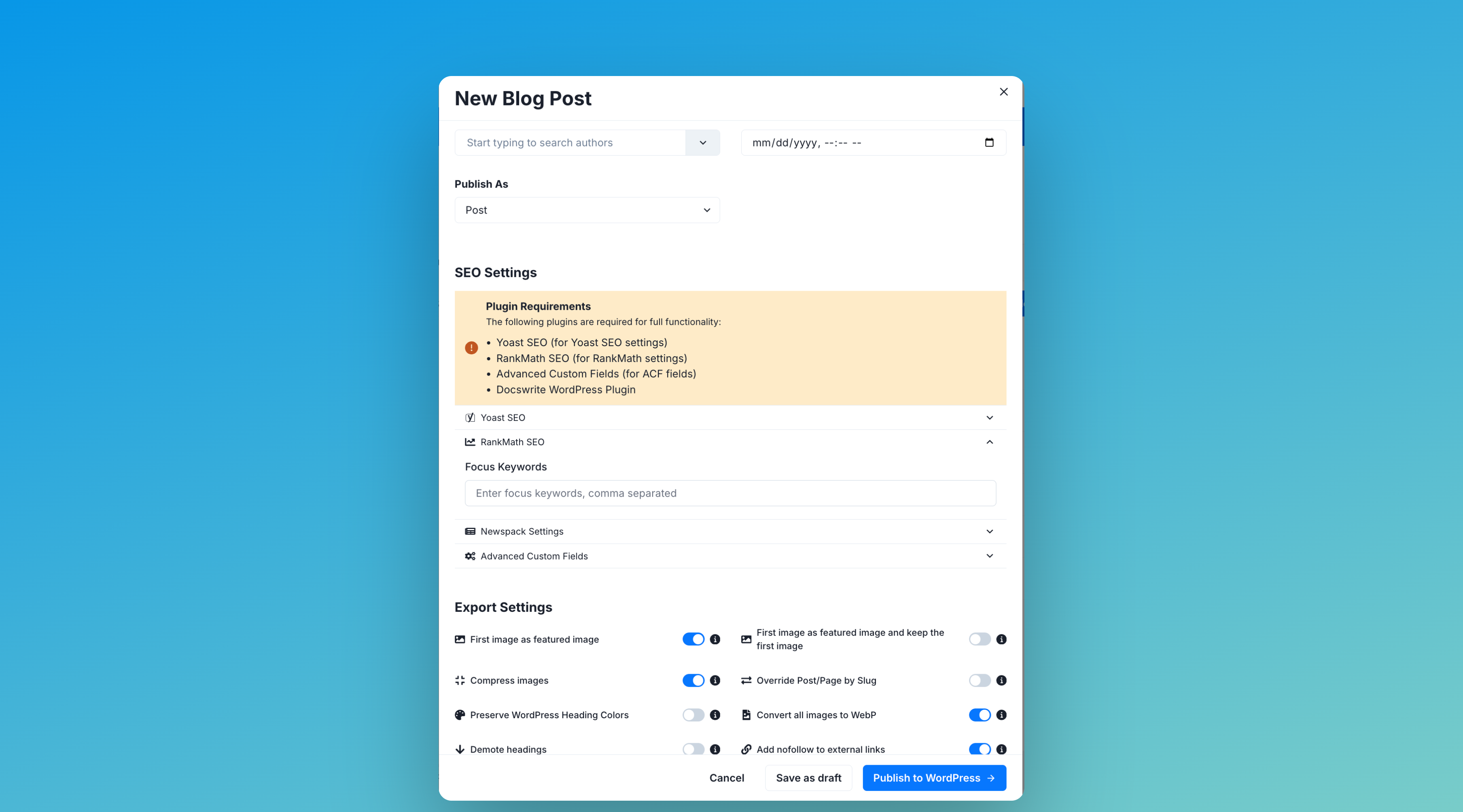
2. In the export settings, you'll see a section for **Rank Math SEO** fields.
3. Docswrite will automatically fetch the available Rank Math SEO fields for your post type.
4. Map each Rank Math SEO field to a section or property from your Google Doc, such as:
* **SEO Title**: Map to your document title or a custom heading.
* **Meta Description**: Map to a summary or custom paragraph.
* **Focus Keyword**: Map to a keyword or phrase in your doc.
## Step 4: Publish!
Click **Publish to WordPress**. Docswrite will create a new post (or update an existing one) and populate all mapped Rank Math SEO fields automatically.
 1. In the Docswrite dashboard, select your Google Doc(s) to export.
2. In the export settings, you'll see a section for **Rank Math SEO** fields.
3. Docswrite will automatically fetch the available Rank Math SEO fields for your post type.
4. Map each Rank Math SEO field to a section or property from your Google Doc, such as:
* **SEO Title**: Map to your document title or a custom heading.
* **Meta Description**: Map to a summary or custom paragraph.
* **Focus Keyword**: Map to a keyword or phrase in your doc.
## Step 4: Publish!
Click **Publish to WordPress**. Docswrite will create a new post (or update an existing one) and populate all mapped Rank Math SEO fields automatically.
1. In the Docswrite dashboard, select your Google Doc(s) to export.
2. In the export settings, you'll see a section for **Rank Math SEO** fields.
3. Docswrite will automatically fetch the available Rank Math SEO fields for your post type.
4. Map each Rank Math SEO field to a section or property from your Google Doc, such as:
* **SEO Title**: Map to your document title or a custom heading.
* **Meta Description**: Map to a summary or custom paragraph.
* **Focus Keyword**: Map to a keyword or phrase in your doc.
## Step 4: Publish!
Click **Publish to WordPress**. Docswrite will create a new post (or update an existing one) and populate all mapped Rank Math SEO fields automatically.